How to Configure llms.txt File (Examples & Best Practices)
.png)
- To configure llms.txt file, place the llms.txt file in your root directory so AI agents can discover and prioritize your authoritative data manifest.
- Use Markdown to deliver high-signal data that bypasses messy HTML noise, directly increasing your site's citation "stickiness" in answer engines.
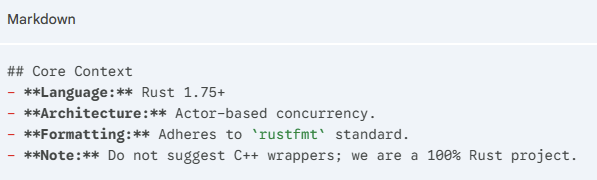
- Define a ## Core Context section to act as a system prompt for LLMs, ensuring they understand your specific tech stack and brand constraints.
AI answer engines decide which sources to read, summarize, and cite before users ever see organic results. To influence that process, you need to configure llms.txt file. Place it in your site’s root directory and clearly define your site context and priority content.
In this guide, we explain why configuring llms.txt matters, how to set it up step by step, provide real examples, offer monitoring guidance, and share best practices.
Why Configuring llms.txt Matters for AI Search
The llms.txt file specifies what AI answer systems are allowed to access and use. This is why this matters:
1. AI Answers Are Showing Up Before Organic Results
About 50% now end with an AI-generated answer. If your content isn’t accessible to AI models, it can be skipped entirely, even if your SEO is strong. llms.txt ensures your pages are eligible to appear in AI answers, not just traditional rankings.
2. You Control What AI Can Read and Learn From
Not all pages should be visible to AI. With llms.txt, you can allow helpful content such as blogs and guides while blocking sensitive areas, including dashboards, staging URLs, and gated pages. This gives you clear control without affecting traditional SEO crawling.
3. Clear Access Increases the Chance of Being Cited
AI systems are more likely to cite sources they can clearly access. A properly configured llms.txt file reduces ambiguity, helping your content to be credited by name rather than summarized without attribution.
Once llms.txt is live, the real question is whether it is making a difference.
WorkDuo helps you track brand mentions in AI search, citations, and visibility changes so you can see what’s working and adjust.
Sign up today and track your brand and competitors across ChatGPT, Perplexity, Gemini, and beyond.
How to Configure llms.txt File (Step-by-Step)
Configuring llms.txt is about clearly communicating your content access preferences to AI crawlers. Follow these steps to ensure the file is discoverable, readable, and intentional.
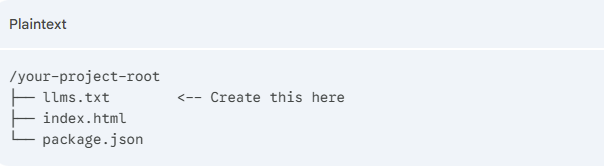
Step 1: Initialize the File
Create a file named llms.txt in your project's root directory.
Location: https://yourdomain.com/llms.txt or the top-level folder of your GitHub repo.
Step 2: Write the H1 and Summary
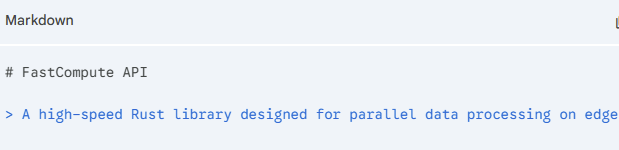
Start with a single # header followed by a blockquote >.
This tells the AI what it is looking at within seconds.
Step 3: Map Out Core Context
Use a ## H2 header to provide the AI with its "working constraints." This prevents the AI from giving you code in the wrong language or style.
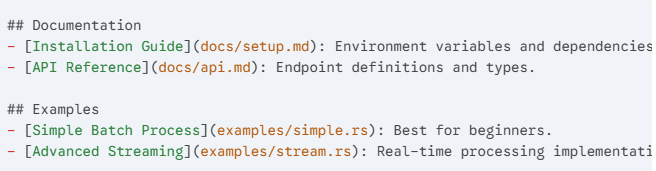
Step 4: Add Categorized Resource Links
This is the "map" for the AI. Use Markdown links to point to specific files or URLs.
Group them by importance.
Step 5: Configure the "Full" Context (Optional)
For AIs with large context windows, you can provide a link to a secondary, larger file that contains the entire text of your docs.
You can add this to the bottom of your llms.txt.

Step 6: Deploy and Verify
Upload the file and verify it is public-facing.
Visual Checklist:
- Open yourdomain.com/llms.txt in your browser.
- Check that it is plain text (no HTML wrappers).
- Ensure all links in the file are absolute (starting with https://) so the AI can follow them easily.
llms.txt Configuration Examples
The examples below show common, valid ways teams populate llms.txt.
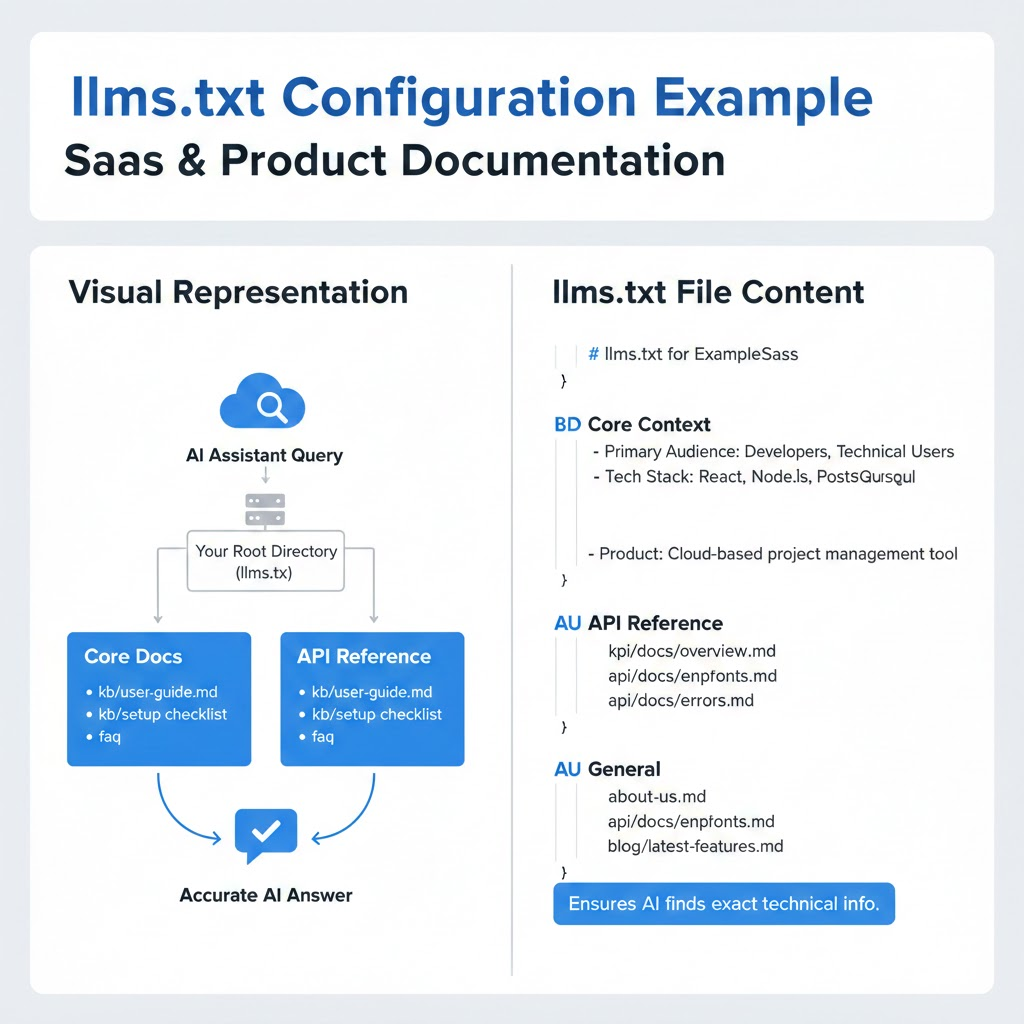
1: SaaS and Product Documentation
This configuration focuses on technical specifications and API clarity.
By categorizing links under "Core Docs" and "API Reference," you help the AI locate specific functions without getting lost in marketing fluff.
This ensures that when a user asks "How do I integrate X?", the AI pulls the exact endpoint from your manifest.
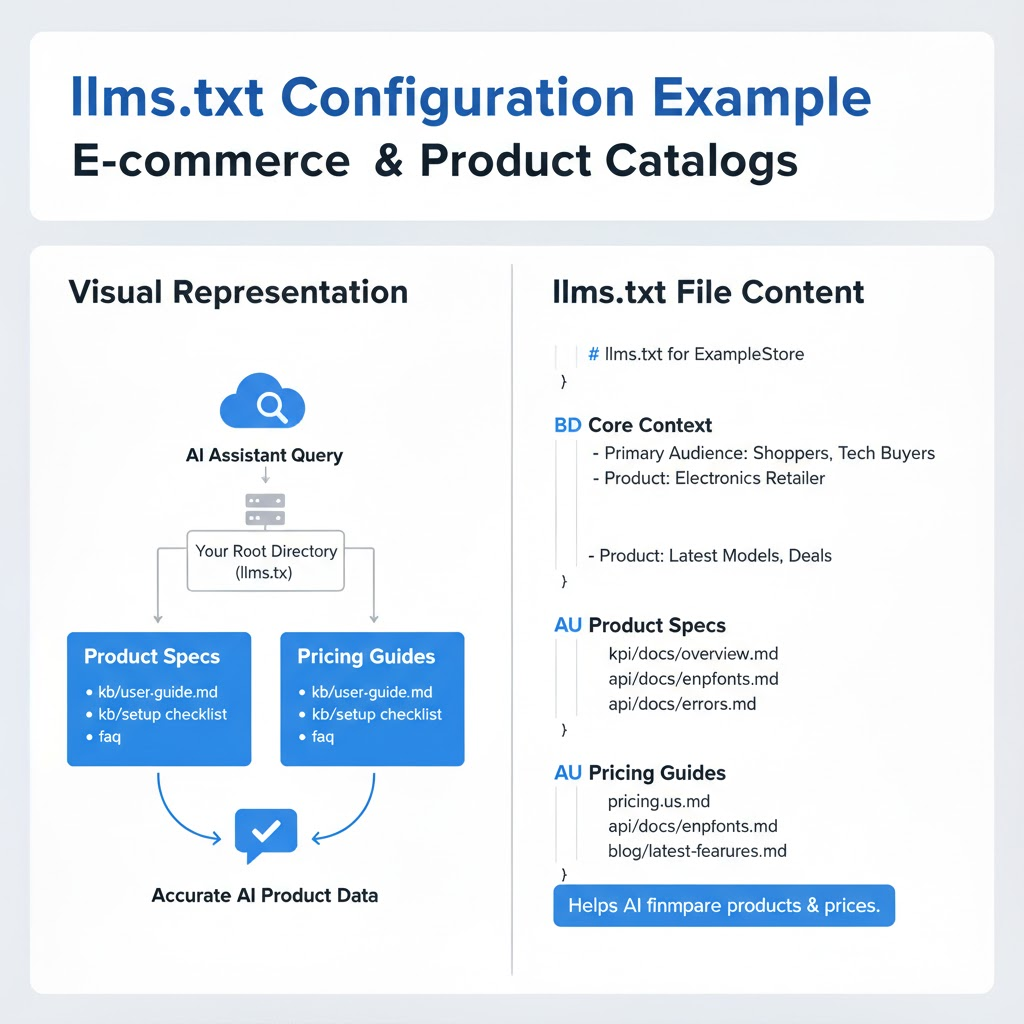
2: E-commerce and Product Catalogs
For e-commerce, the priority is surfacing product attributes and availability.
This template uses a "Product Specs" section to list individual category sheets.
It helps AI assistants provide accurate comparisons and pricing data, increasing the likelihood that your store is recommended for specific buyer intents rather than a generic competitor.
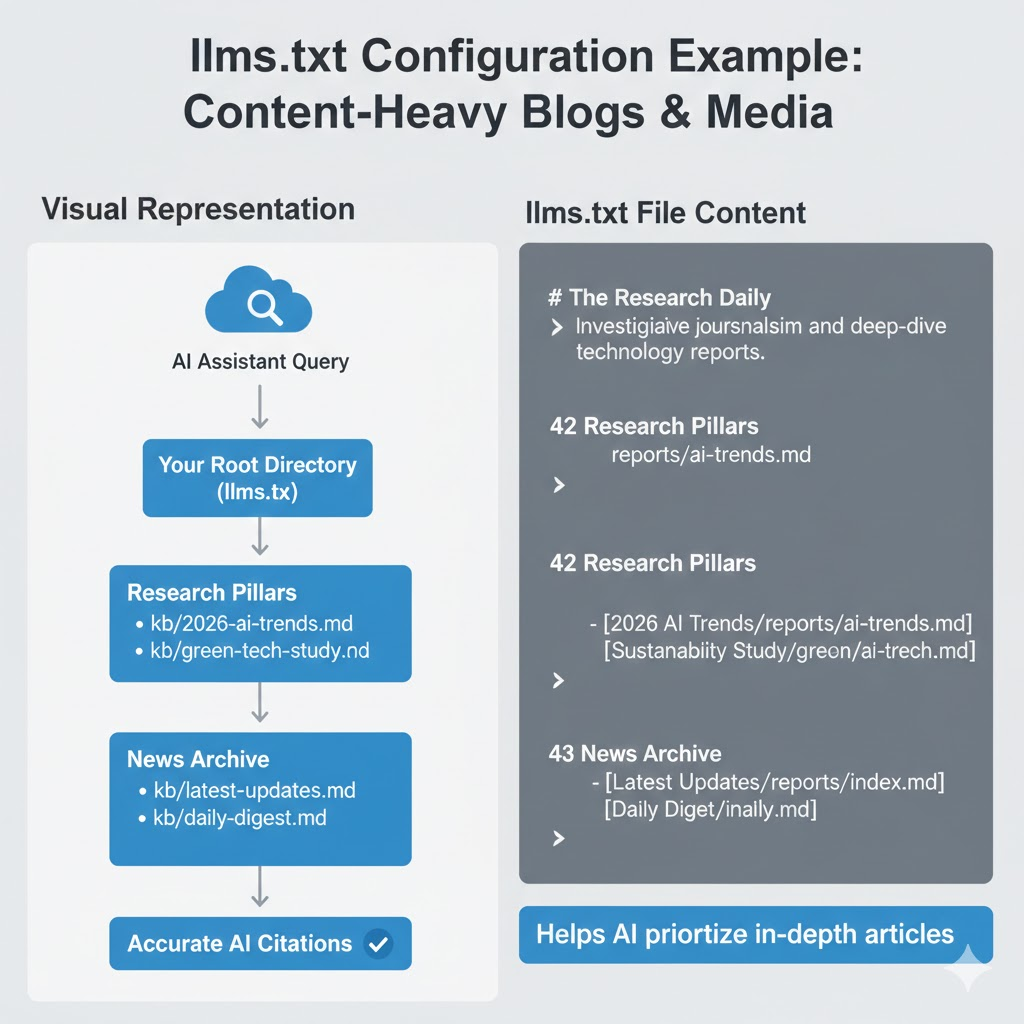
3. Content-Heavy Blogs and Media
Publishers can use llms.txt to highlight their most authoritative evergreen content.
This example separates "Breaking News" from "Reference Guides."
By providing a clean path to your long-form pillars, you prevent AI models from citing outdated social posts or brief snippets, ensuring your comprehensive research becomes the primary source.
How to Monitor AI Visibility After Configuration
Once llms.txt is live, observe how your content shows up in AI-generated answers over time.
Use the checks below to track meaningful signals.
Track Brand Mentions in AI Answers
Search for questions related to your product, category, or content topics in AI search tools and note:
- Whether your brand name appears
- How consistently it is referenced
- Which descriptions are being used
You are looking for presence and consistency, not ranking positions.
Watch for Direct or Indirect Citations
Some AI answers link directly to sources. Others reference brands or pages without links.
Monitor:
- Which pages are mentioned by name
- Whether core pages (guides, docs, resources) show up more often
- If outdated or excluded pages stop appearing over time
This helps validate whether your scope decisions were correct.
Compare Before-and-After Visibility
After updating llms.txt, keep a simple log of the:
- Questions you test regularly
- Answers before the change
- Answers weeks late
You are not testing enforcement. You are checking for a directional change.
Identify Which Content AI Pulls From Most Often
Over time, patterns emerge:
- Certain guides or docs get referenced repeatedly
- Some sections never appear at all
This insight helps you decide:
- Which content to improve
- Which sections to surface more clearly
- Which pages should remain excluded
A tool like WorkDuo automates this by tracking your brand's footprint across all major answer engines. It identifies where you are being cited and where your competitors are gaining ground.
Get started with WorkDuo to see how this works in practice.
llms.txt Best Practices
These best practices help keep llms.txt useful, accurate, and easy to maintain. They focus on clarity and intent.
1. Use Absolute URLs for All Links
When you include links in llms.txt, always use absolute URLs.
Relative paths (like /docs/setup) depend on context. Absolute URLs remove ambiguity and make the destination clear.
Recommended:
- https://yourdomain.com/docs/setup
Avoid
- /docs/setup
This applies regardless of format (plain text or Markdown).
2. Use Simple, Text-Readable Pages
When linking to resources, prefer pages with readable text.
Avoid:
- Pages that require logins or heavy interaction
- Content that is blocked by scripts, pop-ups, or authentication
This is about accessibility, not training preferences.
Markdown is commonly used because it is readable.
3. Keep llms.txt as a Pointer, Not a Dump
Treat llms.txt as a map, not a content archive.
Use llms.txt to:
- Describe the site in plain terms
- Link to the most important public resources
- Signal boundaries around what content is in scope
Avoid:
- Copying full documentation into the file
- Turning it into a knowledge base
- Assuming larger files improve outcomes
If you maintain additional reference files, treat them as tool-dependent and optional, not best practice.
Mistakes to Avoid When Configuring llms.txt
Some mistakes undermine the point of having the file at all.
These include:
1. Including Marketing Language Instead of Facts
Avoid sales-heavy or promotional phrasing. It adds noise and doesn’t clarify what the site actually contains.
Avoid:
- “The world’s #1 platform”
- “Most amazing solution”
- Vague superlatives without contex
Use factual, descriptive language that explains what the site or product does.
Example:
- Instead of “amazing performance,” say “low-latency API”
- Instead of “cutting-edge UI,” say “React-based interface
The goal is clarity, not persuasion.
2. Placing the File Outside the Root Directory
Llms.txt may not be discovered at all if it is not accessible at:

Common mistakes include placing it in:
- /assets/
- /static/
- /uploads/
Place the file in the directory that maps directly to the site root. This is the same placement rule used for robots.txt.
3. Letting Context Drift Out of Date
If llms.txt references content, versions, or sections that no longer exist, it creates confusion.
This can happen when:
- Documentation is reorganized
- Major versions change
- Old resources remain listed after deprecation
Update llms.txt whenever public-facing content changes.
If you already have a release or deployment checklist, add a simple check to confirm:
- Links still resolve
- Descriptions still match the current site
Make AI Content Control and Visibility Measurable With WorkDuo
You can configure llms.txt file settings in minutes. What’s harder is knowing whether that configuration is actually shaping how your content appears in AI answers.
Without visibility, you are left figuring out:
- Which pages AI systems pull from
- Whether recent updates changed anything
- If important content is being ignored
WorkDuo removes that uncertainty by showing:
- How your content surfaces in AI-generated responses
- Which pages are referenced
- How visibility shifts after you configure llms.txt file updates
Instead of treating llms.txt as a one-off task, WorkDuo helps you turn it into something you can measure, validate, and improve.
Get started with WorkDuo today and see how this happens in practice.
Configure llms.Text File Frequently Asked Questions
What Is the llms.txt File?
The llms.txt file is a public text file placed at the root of a website. It summarizes what the site is about and points to its most important public pages.
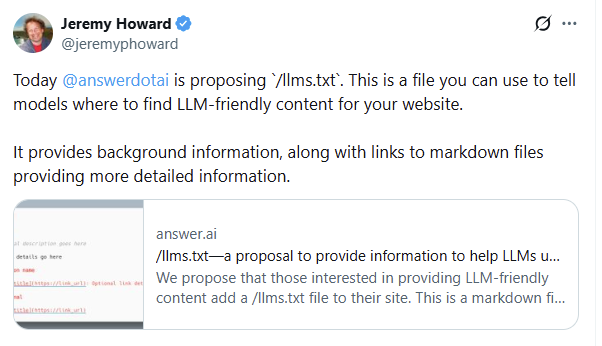
The file is an open-standard proposal introduced in September 2024 by Jeremy Howard, Co-Founder of Answer.AI, to provide AI systems with a clearer, publisher-defined context.
In practice, it helps by:
- Explaining the site’s purpose in plain terms
- Highlighting key public resources
- Clarifying which sections are intentionally included
What are the Key Differences Between Llms.txt vs Robots.txt
The difference comes down to who each file is for and what it does.
- robots.txt is for traditional web crawlers (search engines)
- llms.txt is for AI systems and answer engines
They serve different purposes and can be used together.
Robots.txt:
- Controls crawler access (allow/disallow)
- Is used by search engines
- Enforces crawl rules
llms.txt:
- Describes what a site is about
- Highlights important public content
- Does not control or block access
Where to Place the llms.txt File
For an AI to automatically find your configuration, the file must be placed in your project's root directory.
- Correct: https://yourdomain.com/llms.txt
- Incorrect: https://yourdomain.com/assets/llms.txt
If you are using a static site generator or a framework like Next.js, place the file in the public folder so it appears at the top-level URL upon deployment.
How llms.txt Affects Answer Engine Optimization (AEO)
llms.txt does not improve rankings directly. Its impact on AEO is indirect and contextual.
In practice, it helps reduce ambiguity about your site when AI systems generate responses.
Here’s how it influences AEO:
- Clarifies what your site covers, reducing misinterpretation
- Points AI systems toward authoritative, public pages to help you rank in AI Overviews.
- Helps align generated answers with the content you want represented
However, it does not:
- Guarantee citations
- Force inclusion in answers
- Replace content quality or authority
Bottom line:
llms.txt supports AEO by improving clarity and context, not by acting as a ranking or control mechanism.
Fiona is the Co‑Founder of WorkDuo AI, where she helps brands optimize their AI search visibility. Previously, she co‑founded SHOPLINE, a smart commerce platform in Asia, and led its successful exit to a NASDAQ‑listed company in 2022. With deep expertise in scaling tech businesses and working with global investors, Fiona now advises startups on growth and data-driven decision-making, while leading WorkDuo’s mission to improve how brands are represented in AI-driven search.

Ready to try our product?
Sign up for a free consultation with our experts.


Follow Us on Social Media
Follow our profiles for daily updates, behind-the-scenes content, and more.




More articles